

Elementor handles lightboxes for images, galleries and carousels natively. If all you need is to open the gallery by clicking the images, setup is simple: link the images to Media File and enable the lightbox in the widget or in the global settings.
Things get more specific when you want to open an Elementor gallery by clicking a button. Elementor has no dedicated control for this, but you can achieve it using the attributes the builder adds to lightbox links.
1. Check that the lightbox is enabled
Under Site Settings → Lightbox, check that the image lightbox is enabled. In the Gallery or Basic Gallery widget, also set the image link to Media Files.
2. Create the gallery
Add the images to the gallery and publish or update the page. Then open the front end: the value we need is only generated in the page’s final HTML.
3. Find the slideshow ID
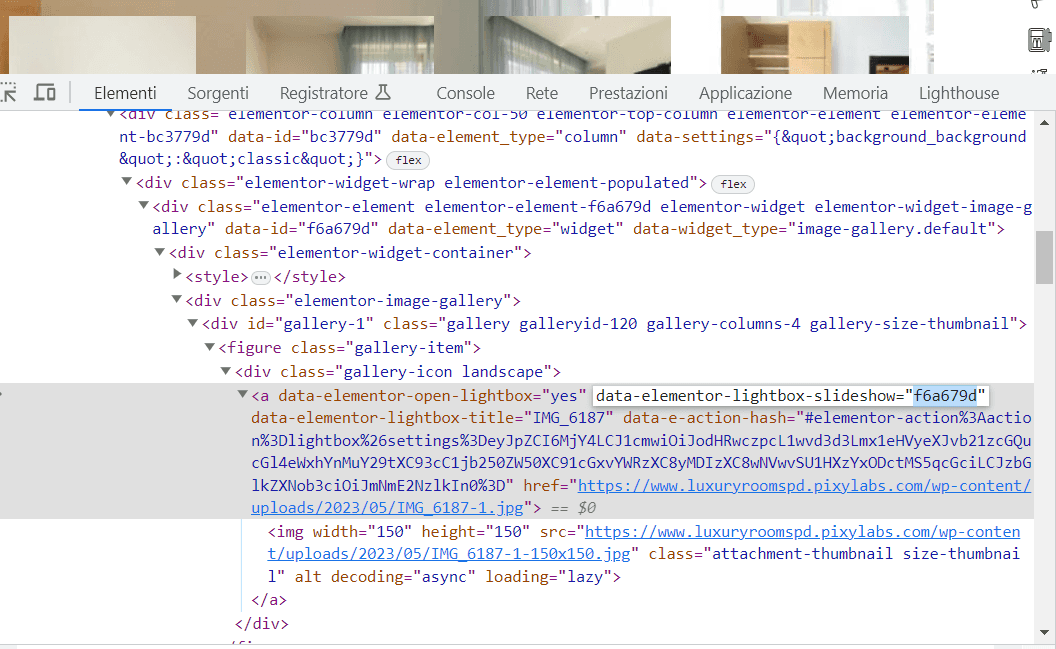
Open the browser’s developer tools, select the link of one of the gallery images and look for an attribute like:
data-elementor-lightbox-slideshow="f6a679d"The value differs from one gallery to another. Copy it: you will use it to connect the button to the same group of images.
4. Create the button
Add a Button widget. As the link, use the media file URL of the first image you want to open.
In the button’s advanced options, add these custom attributes:
data-elementor-open-lightbox|yes
data-elementor-lightbox-slideshow|f6a679d
Replace f6a679d with the value taken from your gallery.
5. Test on the front end
Save the page, clear any caches and try the button on the front end. It should open the first image and let you browse the images in the same lightbox group.
Be aware: this is a workaround
data-elementor-lightbox-slideshow is an attribute Elementor uses internally to group images. It is still present in recent versions of the builder, but it should not be considered a stable public API.
After major Elementor updates, check that the markup has not changed and take the value from the front end again.
If you do not need the button, use the standard solution
If the goal is simply to open the images in a lightbox, avoid this workaround: use Gallery or Basic Gallery directly with Media Files + Lightbox. It is simpler, more stable and easier to maintain.
If you are working on a more complex Elementor project, see also my Elementor services and the guide on how to use Elementor without weighing down your site.