

Headless WordPress · Next.js · React · Performance
Pixy Labs
The old pixylabs.com worked, but it no longer represented me. It was a WordPress site built with Elementor: quick to put together, heavy to grow.
- Client
- Pixy Labs (in-house project)
- Year
- 2026
- Technologies
- ACF · Claude AI · GitHub Actions · Next.js · Node.js · Rank Math · React · TypeScript · WordPress · WPGraphQL · WPML
- Website
- pixylabs.com ↗
The problem
Where the client
was starting from
The old pixylabs.com worked, but it no longer represented me. It was a WordPress site built with Elementor: quick to put together, heavy to grow.
- A page builder under every page: layout, styles and content were mixed together in Elementor's data, with extra plugins for chat, cookies, internal links and downloads. Every update was a small risk.
- A vague positioning: the site said “web development and digital solutions”, like a thousand others. It didn't tell the story of complex WordPress projects, project management and accessibility, which are the heart of my work.
- Mobile performance to defend: on desktop the site was fine, but on a phone the first content took more than 3 seconds to appear.
- The public site and the WordPress admin on the same domain, with PHP, database and plugins exposed on every visit.
I wanted a site that would be both a showcase and concrete proof: fast, secure, bilingual, easy to update, and built with the technologies I recommend to my clients.
The solution
What I
designed and built
I rethought the site from scratch: strategy, content, design and architecture. The result is a headless WordPress, used only to manage content, with a separate frontend written in Next.js and React.
Goodbye Elementor, hello headless architecture
- WordPress stays the control panel where I write articles, projects and services, on a dedicated subdomain. I modelled the content with custom post types and ACF fields in a plugin that is independent of the theme, so it no longer depends on any page builder.
- The site visitors see is a Next.js application (React, TypeScript) that reads content through WPGraphQL and serves pre-rendered pages, which update on their own when I change something in the CMS.
- Elementor, Elementor Pro and five more plugins deactivated: what was really needed, such as the cookie banner and the WhatsApp contact, is now custom-built, lighter and under control.
- No lost links: I checked all 83 URLs of the old site and set up redirects wherever pages changed. SEO data is still managed with Rank Math.
Redesign and positioning
- A new visual identity consistent with the logo: midnight blue, violet and a coral accent, a more editorial typography, and an animated path on the home page that tells the “from need to launch” method.
- Services rewritten around what I do best: WordPress for complex projects, project management and technical coordination, web accessibility.
- Real case studies, with the problem, the solution and the technologies used, instead of a simple portfolio gallery.
- A bilingual site in Italian and English with WPML, for international clients and companies.
Performance: measured on mobile, page by page
I measured performance instead of estimating it. I used Lighthouse, Google's auditing tool, in mobile mode: it simulates a mid-range phone on a slow mobile network, the conditions where a website is really put to the test. I compared five equivalent pages of the old and the new site, measured alternately from the same server and several times each, and kept the median. I discarded skewed runs, for example those taken while the server was restarting.
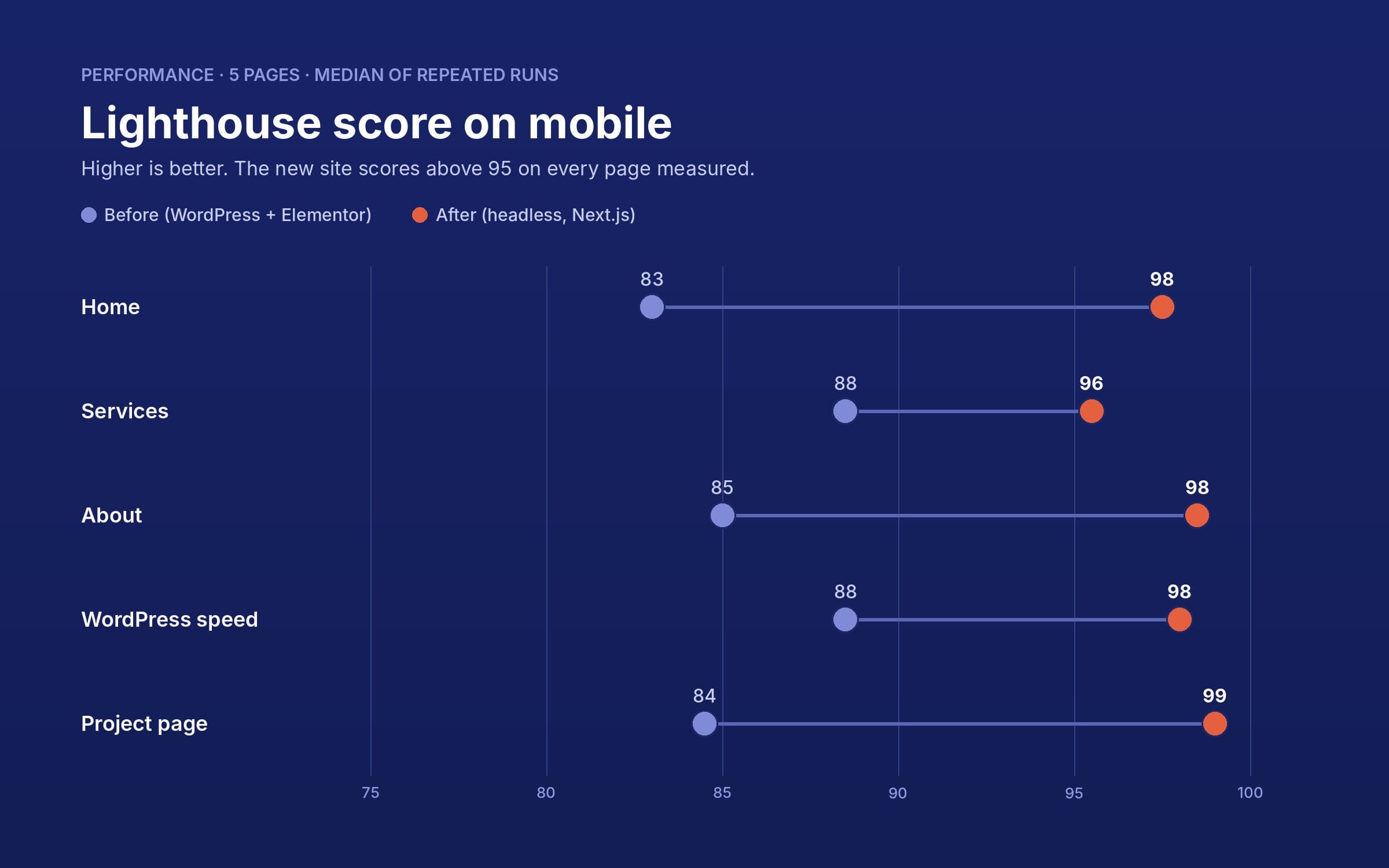
On average, across the five pages:
- the performance score goes from 86 to 98;
- the first content appears in 1.3 seconds instead of 3.0 (−57%);
- the main content is ready in 2.1 seconds instead of 3.4 (−38%);
- 69% fewer requests and a page that weighs 30% less;
- the layout barely moves while loading (CLS close to 0);
- accessibility, best practices and SEO score 100 on every page measured.
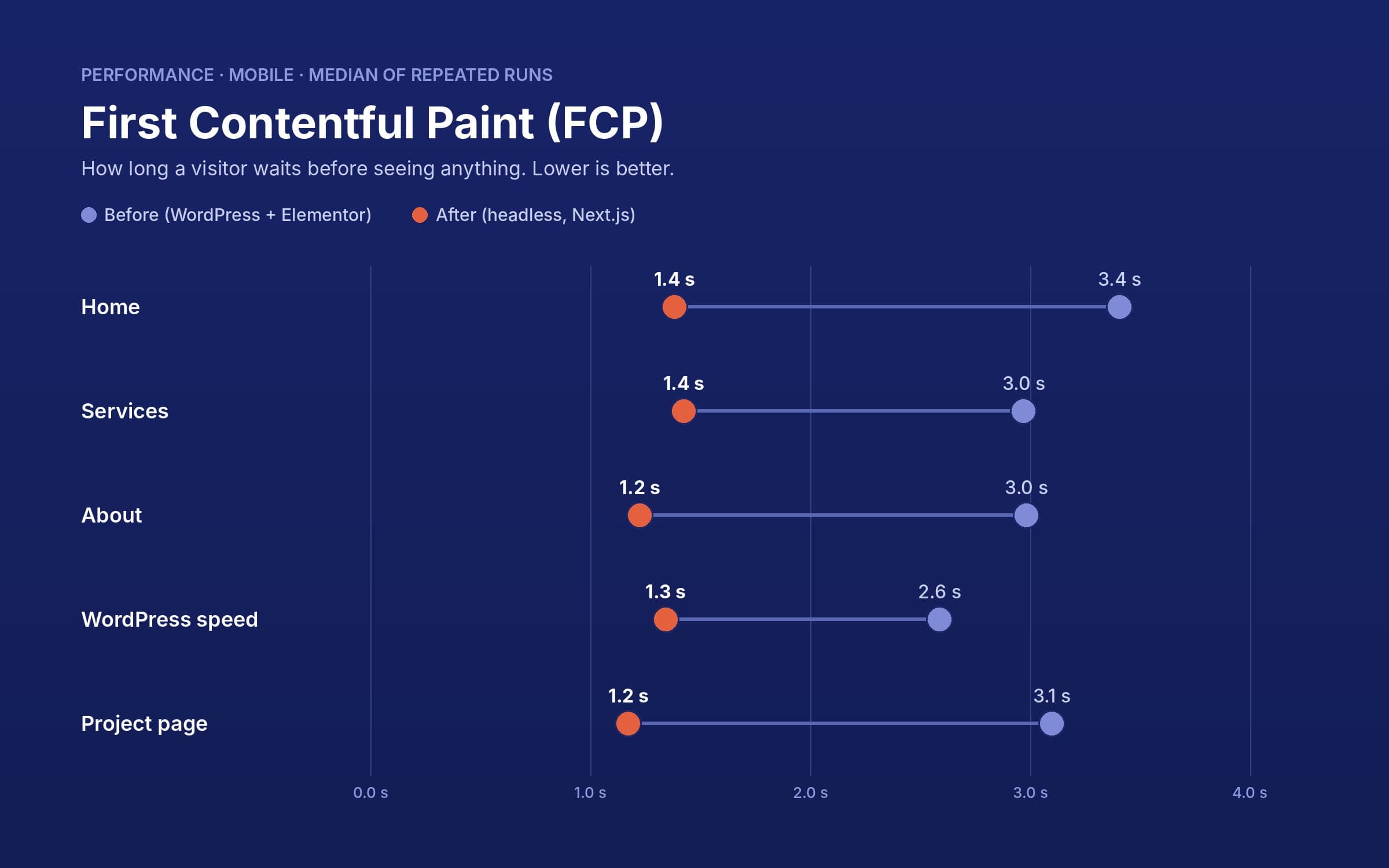
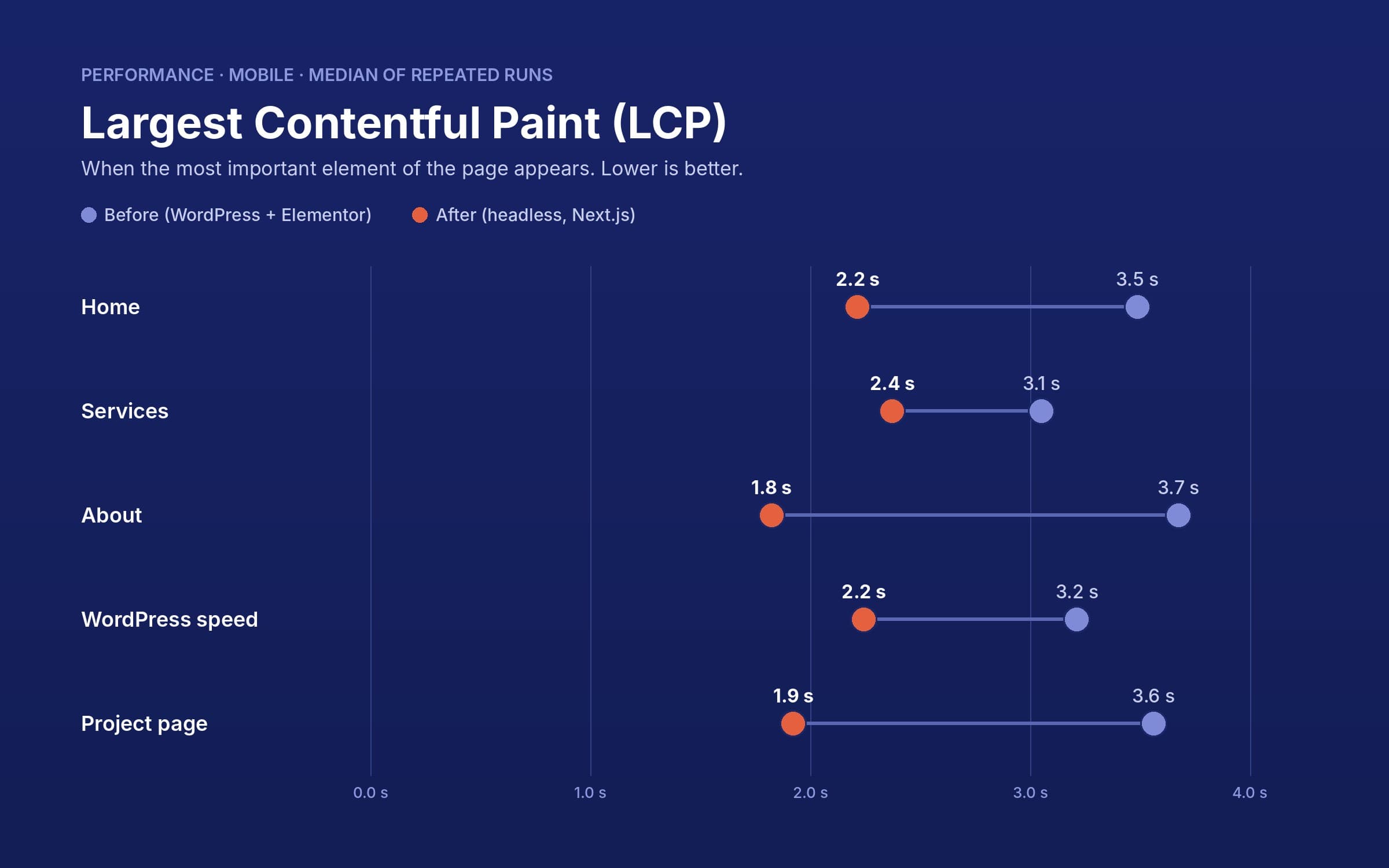
Where the difference comes from. The old site wasn't slow out of neglect: it was already optimised, but a page builder carries much more than a page actually uses. Looking at what the home page loads shows where the gain is:
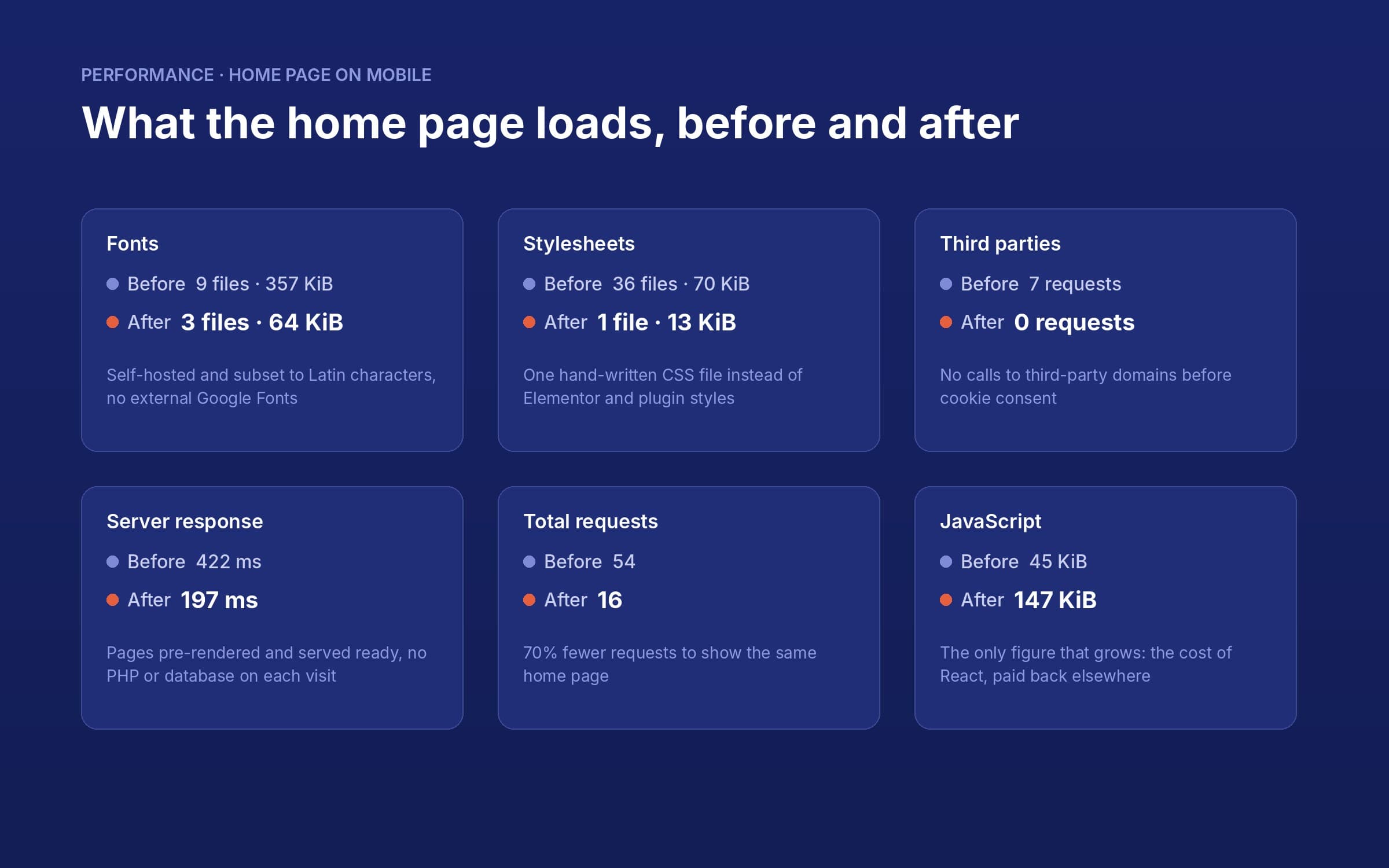
- Self-hosted fonts subset to Latin characters: from 357 to 64 KiB, with no connection to Google Fonts.
- A single 13 KiB stylesheet instead of 36 files from Elementor and plugins.
- Pre-rendered pages refreshed in the background: the server answers in about 200 milliseconds instead of more than 400, without running PHP or querying the database on every visit.
- No third-party services on load: Google Analytics only arrives after consent.
What I optimised after the first measurements. The first version of the new site was already faster, but the measurements showed where it could do better, and I fixed:
- the opening text faded in, delaying the main content: now it is visible from the first frame and only moves a few pixels;
- the project images waited for the animation to finish before appearing: now they are painted immediately, under the reveal effect;
- the site prefetched every page linked in the menu and footer, about fifteen requests competing for bandwidth on mobile: now a page is prepared only when you hover or tap it, and the home page went from 36 to 16 requests;
- the home page animation rebuilt its line on every frame: now it recalculates it only when its shape changes, starts once the page has loaded and stops when it scrolls out of view;
- two accessibility issues: the violet on light backgrounds now has a 4.7:1 contrast ratio (WCAG AA) and a wrong ARIA role has been fixed.
The trade-off, in plain words. The only figure that grows is JavaScript, from 45 to 147 KiB: it is the cost of React, which makes the site a modern application. On mobile it blocks the page for about 70 milliseconds on average, well below the 200 ms threshold set by Google, and the savings on fonts, styles, requests and server more than pay for it.
More secure by design
- The public site doesn't run WordPress: visitors to pixylabs.com never touch PHP or the database. The admin panel lives on a separate domain.
- Fewer plugins, smaller attack surface: seven fewer plugins to update and monitor.
- Security headers on every page (HSTS, protection against framing and MIME sniffing, restricted browser permissions) and no hints about the server technology.
- A protected contact form, guarded against spam and header injection, sending through the domain's own mailbox.
Privacy without plugins
The cookie banner is custom-built following the Italian Data Protection Authority's guidelines: Google Analytics loads only after consent, “Accept” and “Reject” carry the same weight, and the choice can be changed at any time from the footer. The Privacy and Cookie Policies were rewritten with tables of the cookies actually in use.
Automated releases
The code lives in a private GitHub repository. Every approved change is built and published automatically with GitHub Actions to a Node.js hosting, going first through a staging environment where I check everything before launch.
With AI at my side
I built this project together with Claude, Anthropic's AI assistant. Strategy, positioning, content, design and architecture choices are mine; Claude helped me write and review the code, prepare the images, measure performance and automate releases. Every change went through staging and my review before going live.
It's the same method I bring to client projects: AI speeds up the repetitive work, experience decides what to build and how.
Technologies used
The right tools,
each with its role
- ACF
- Claude AI
- GitHub Actions
- Next.js
- Node.js
- Rank Math
- React
- TypeScript
- WordPress
- WPGraphQL
- WPML